> ## Documentation Index
> Fetch the complete documentation index at: https://docs.knowlix.ai/llms.txt
> Use this file to discover all available pages before exploring further.
# AI Accounting
> Streamline your financial operations with intelligent invoice management, automated reporting, and real-time analytics
Knowlix AI Accounting streamlines your financial operations with intelligent invoice management, automated reporting, and real-time analytics. Manage your entire accounting workflow from invoicing to insights.
 ### 1. Invoicing Dashboard
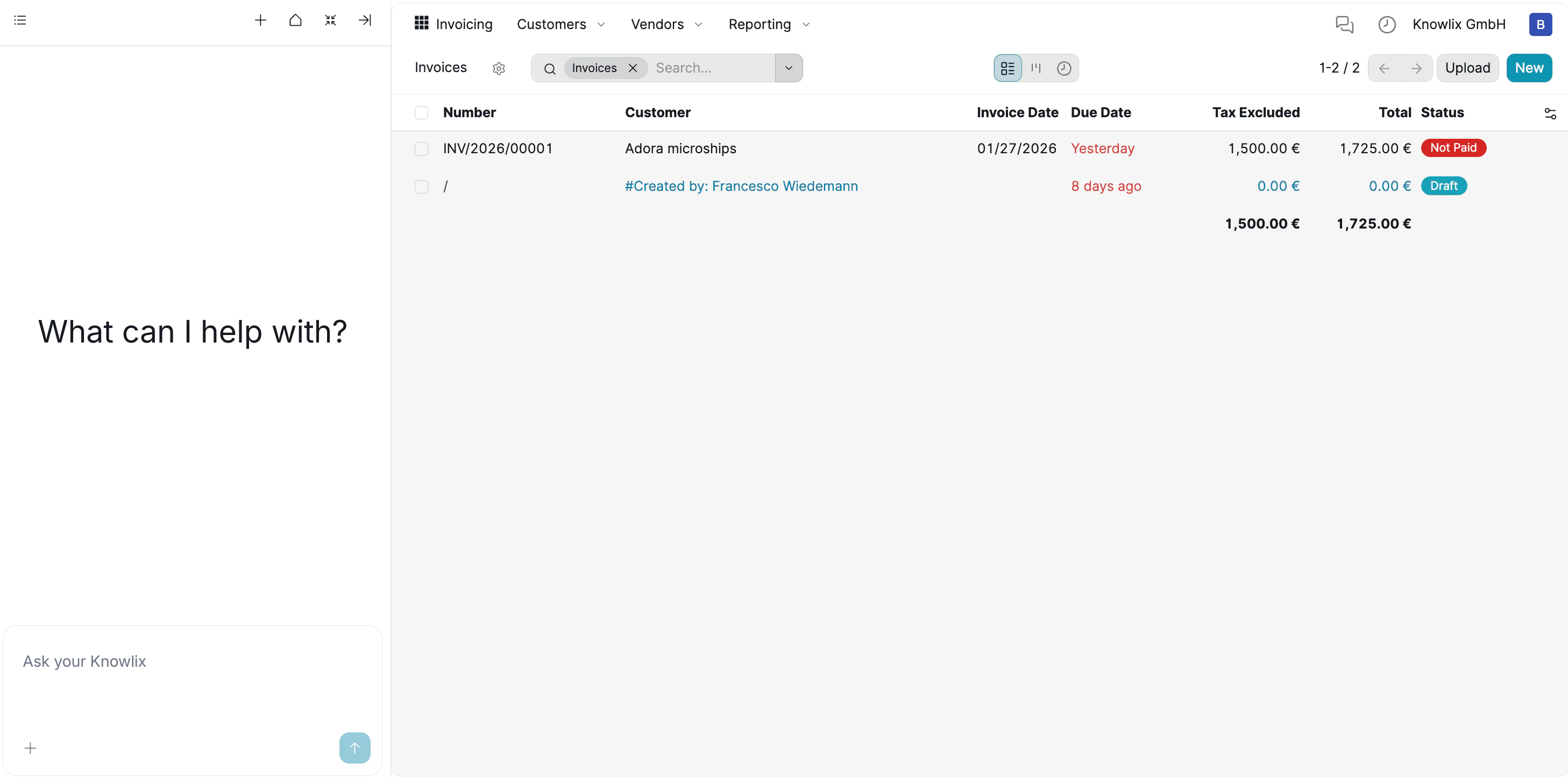
The Invoicing Dashboard provides a centralized view of all customer invoices, allowing you to track revenue and payment statuses at a glance.
* **Overview:** View essential details such as Invoice Number, Customer, Due Date, and Total Amount in a list format.
* **Status Tracking:** Color-coded tags (e.g., **Not Paid**, **Draft**) allow you to instantly identify pending payments or overdue accounts.
* **Management:** Click on any invoice (e.g., *INV/2026/00001*) to open the detailed view, where you can register payments or send reminders.
**AI Shortcut:**
Instead of manually filtering, you can ask the Assistant: "Show me all unpaid invoices" or "How much does Adora microships owe us?" to get instant financial insights.
### 2. Intelligent Invoice Creation
The AI Assistant guides you through invoice creation by identifying missing information and ensuring accuracy before generation.
### 1. Invoicing Dashboard
The Invoicing Dashboard provides a centralized view of all customer invoices, allowing you to track revenue and payment statuses at a glance.
* **Overview:** View essential details such as Invoice Number, Customer, Due Date, and Total Amount in a list format.
* **Status Tracking:** Color-coded tags (e.g., **Not Paid**, **Draft**) allow you to instantly identify pending payments or overdue accounts.
* **Management:** Click on any invoice (e.g., *INV/2026/00001*) to open the detailed view, where you can register payments or send reminders.
**AI Shortcut:**
Instead of manually filtering, you can ask the Assistant: "Show me all unpaid invoices" or "How much does Adora microships owe us?" to get instant financial insights.
### 2. Intelligent Invoice Creation
The AI Assistant guides you through invoice creation by identifying missing information and ensuring accuracy before generation.
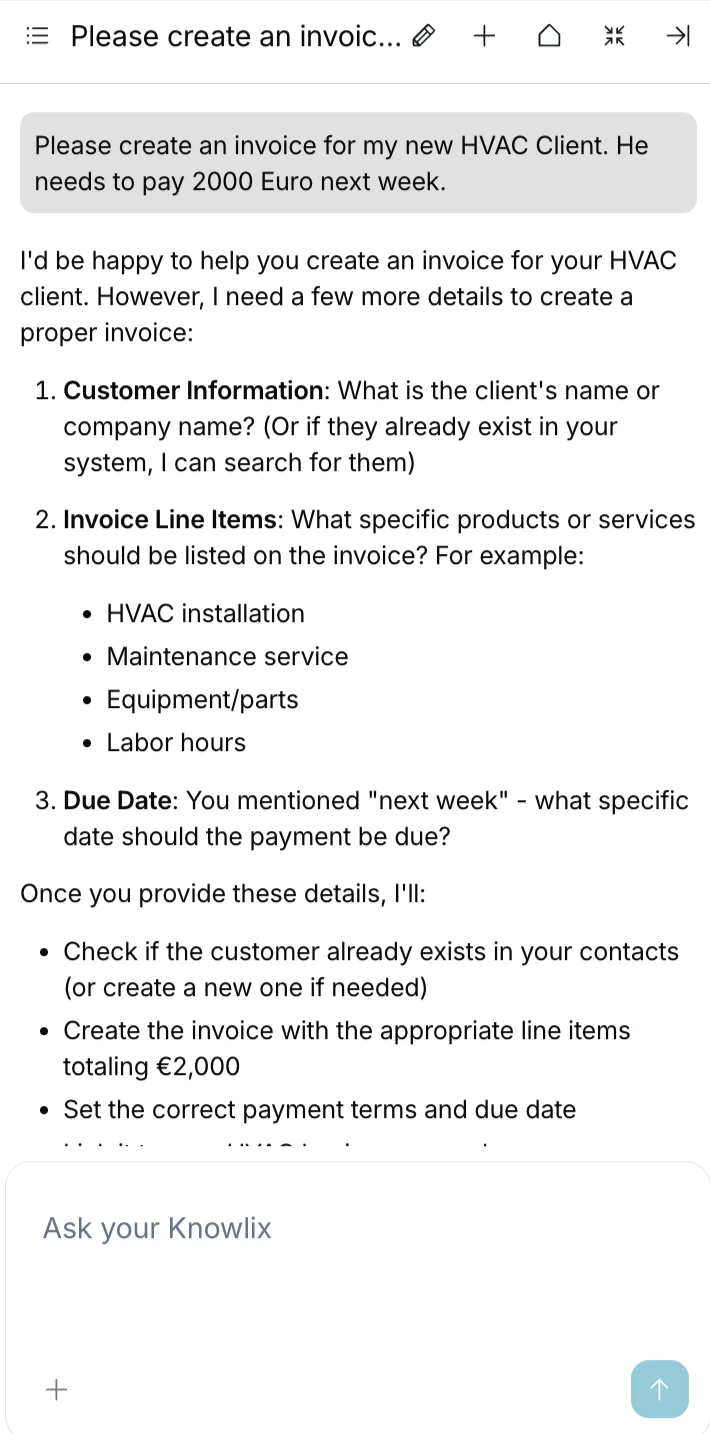
The AI Assistant guides you through invoice creation by identifying missing information and ensuring accuracy before generation.
**User Command:**
*"Please create an invoice for my new HVAC Client. He needs to pay 2000 Euro next week."*
**Assistant Response:**
Since the command is vague, the Assistant identifies the missing pieces and requests:
1. **Customer Identity:** "What is the client's specific name?"
2. **Line Items:** "What specific service was provided (e.g., Installation, Parts)?"
3. **Due Date:** "What specific date constitutes 'next week'?"
### 3. Intelligent Execution & Draft Generation
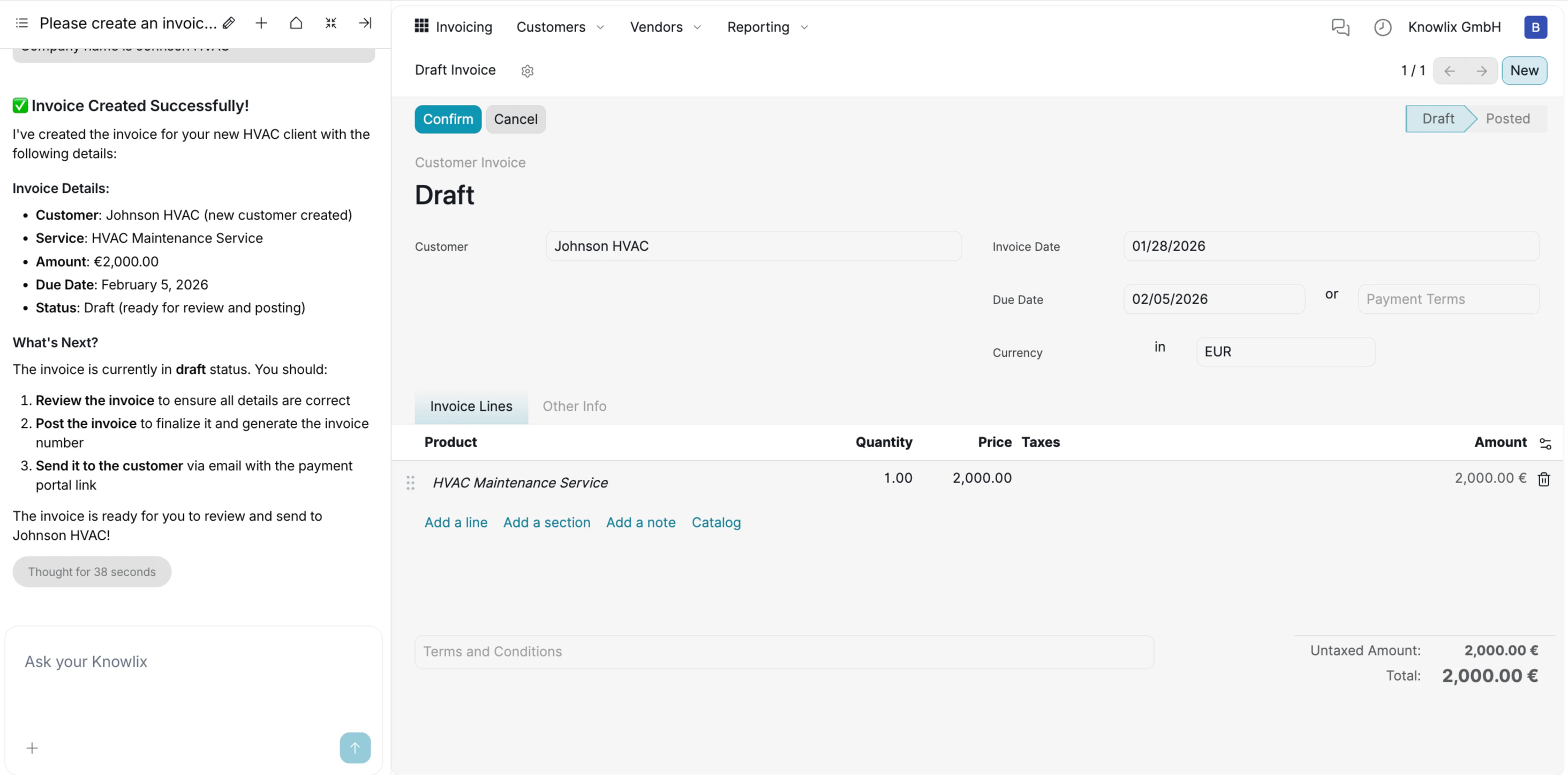 Once you answer the Assistant's clarifying questions, Knowlix processes the new information to generate the document immediately. It handles all necessary data entry in the background.
**Key Capabilities:**
* **Automatic Record Creation:** The system recognized that "Johnson HVAC" and "HVAC Maintenance Service" did not exist and created them automatically as a **New Customer** and **New Product**.
* **Smart Date Calculation:** The Assistant interpreted "next week" relative to the current date and automatically set the **Due Date** to Feb 5, 2026.
* **Draft Safety:** The invoice is generated in **Draft** status, giving you full control to review the details before finalizing or posting the invoice.
### 4. Analytics & Reporting Dashboard
Once you answer the Assistant's clarifying questions, Knowlix processes the new information to generate the document immediately. It handles all necessary data entry in the background.
**Key Capabilities:**
* **Automatic Record Creation:** The system recognized that "Johnson HVAC" and "HVAC Maintenance Service" did not exist and created them automatically as a **New Customer** and **New Product**.
* **Smart Date Calculation:** The Assistant interpreted "next week" relative to the current date and automatically set the **Due Date** to Feb 5, 2026.
* **Draft Safety:** The invoice is generated in **Draft** status, giving you full control to review the details before finalizing or posting the invoice.
### 4. Analytics & Reporting Dashboard
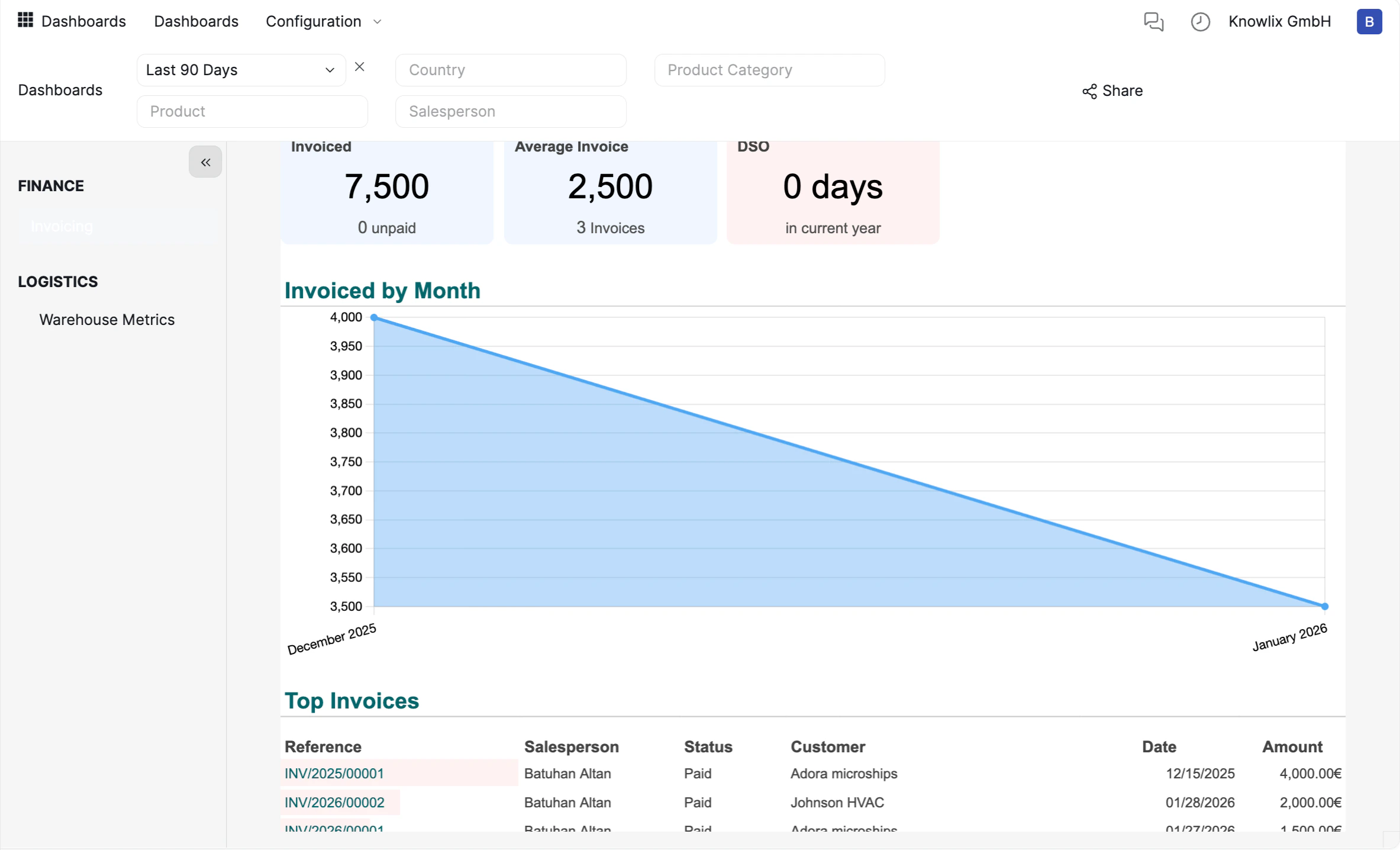 The Analytics Dashboard transforms your raw business data into actionable insights. It provides a real-time visual overview of your company's performance, combining high-level KPIs with granular transaction details.
**Key Components:**
* **Performance Cards (KPIs):** The top row displays critical financial metrics instantly, such as **Total Invoiced** (7,500), **Average Invoice Value** (2,500), and **DSO** (Days Sales Outstanding). This allows for a health check of your business in seconds.
* **Trend Visualization:** The **"Invoiced by Month"** chart offers a clear visual representation of revenue trends over time, helping you identify seasonal patterns or growth trajectories.
* **Detailed Breakdown:** The **"Top Invoices"** section lists specific transactions. You can see the Reference, Salesperson, Status, and Amount for individual deals without navigating to the Sales app.
### 5. Dynamic Filtering & Custom Reports
You can customize the view to answer specific questions using the top navigation bar:
* **Timeframe:** Switch between "Last 90 Days," "This Year," or custom ranges.
* **Segmentation:** Filter the data by **Salesperson**, **Product Category**, or **Country** to isolate specific performance drivers.
**AI Shortcut:**
Instead of manually applying complex filters, you can ask the Assistant: *"Show me the sales performance for sales person last month"* or *"What is our average invoice size this quarter?"* to get the data instantly.
***
## More Information
Double-entry bookkeeping system and financial reporting
Employee expense tracking and reimbursement management
Online payment integrations and gateway configuration
Country-specific tax and accounting packages for 100+ countries
Employee payroll processing and compensation management
Import/export data in CSV, Excel, and other formats
Built-in reports, pivot tables, and custom dashboards
AI assistant tips for the Finance module
The Analytics Dashboard transforms your raw business data into actionable insights. It provides a real-time visual overview of your company's performance, combining high-level KPIs with granular transaction details.
**Key Components:**
* **Performance Cards (KPIs):** The top row displays critical financial metrics instantly, such as **Total Invoiced** (7,500), **Average Invoice Value** (2,500), and **DSO** (Days Sales Outstanding). This allows for a health check of your business in seconds.
* **Trend Visualization:** The **"Invoiced by Month"** chart offers a clear visual representation of revenue trends over time, helping you identify seasonal patterns or growth trajectories.
* **Detailed Breakdown:** The **"Top Invoices"** section lists specific transactions. You can see the Reference, Salesperson, Status, and Amount for individual deals without navigating to the Sales app.
### 5. Dynamic Filtering & Custom Reports
You can customize the view to answer specific questions using the top navigation bar:
* **Timeframe:** Switch between "Last 90 Days," "This Year," or custom ranges.
* **Segmentation:** Filter the data by **Salesperson**, **Product Category**, or **Country** to isolate specific performance drivers.
**AI Shortcut:**
Instead of manually applying complex filters, you can ask the Assistant: *"Show me the sales performance for sales person last month"* or *"What is our average invoice size this quarter?"* to get the data instantly.
***
## More Information
Double-entry bookkeeping system and financial reporting
Employee expense tracking and reimbursement management
Online payment integrations and gateway configuration
Country-specific tax and accounting packages for 100+ countries
Employee payroll processing and compensation management
Import/export data in CSV, Excel, and other formats
Built-in reports, pivot tables, and custom dashboards
AI assistant tips for the Finance module