> ## Documentation Index
> Fetch the complete documentation index at: https://docs.knowlix.ai/llms.txt
> Use this file to discover all available pages before exploring further.
# AI Factory
> Revolutionize manufacturing operations with AI-automated production orders, Bill of Materials creation, and sales order generation
Knowlix AI Factory revolutionizes manufacturing operations by automating production orders, Bill of Materials creation, and sales order generation through natural language commands. Skip complex ERP menus and create complete manufacturing workflows in seconds.
The AI Factory module provides:
* **AI Manufacturing Orders:** Generate production orders instantly with chat commands
* **Automated BoM Creation:** AI automatically creates Bills of Materials based on context
* **Smart Product Recognition:** Identifies components and materials from simple descriptions
* **Sales Order Integration:** Seamlessly converts manufacturing orders to sales orders
* **Contact Management:** Auto-creates new customers and products as needed
* **Real-Time Workflow:** Complete manufacturing-to-sales pipeline in one conversation
***
## 1. Access the Manufacturing Module
The manufacturing dashboard provides a clear overview of your production pipeline with integrated AI assistance.
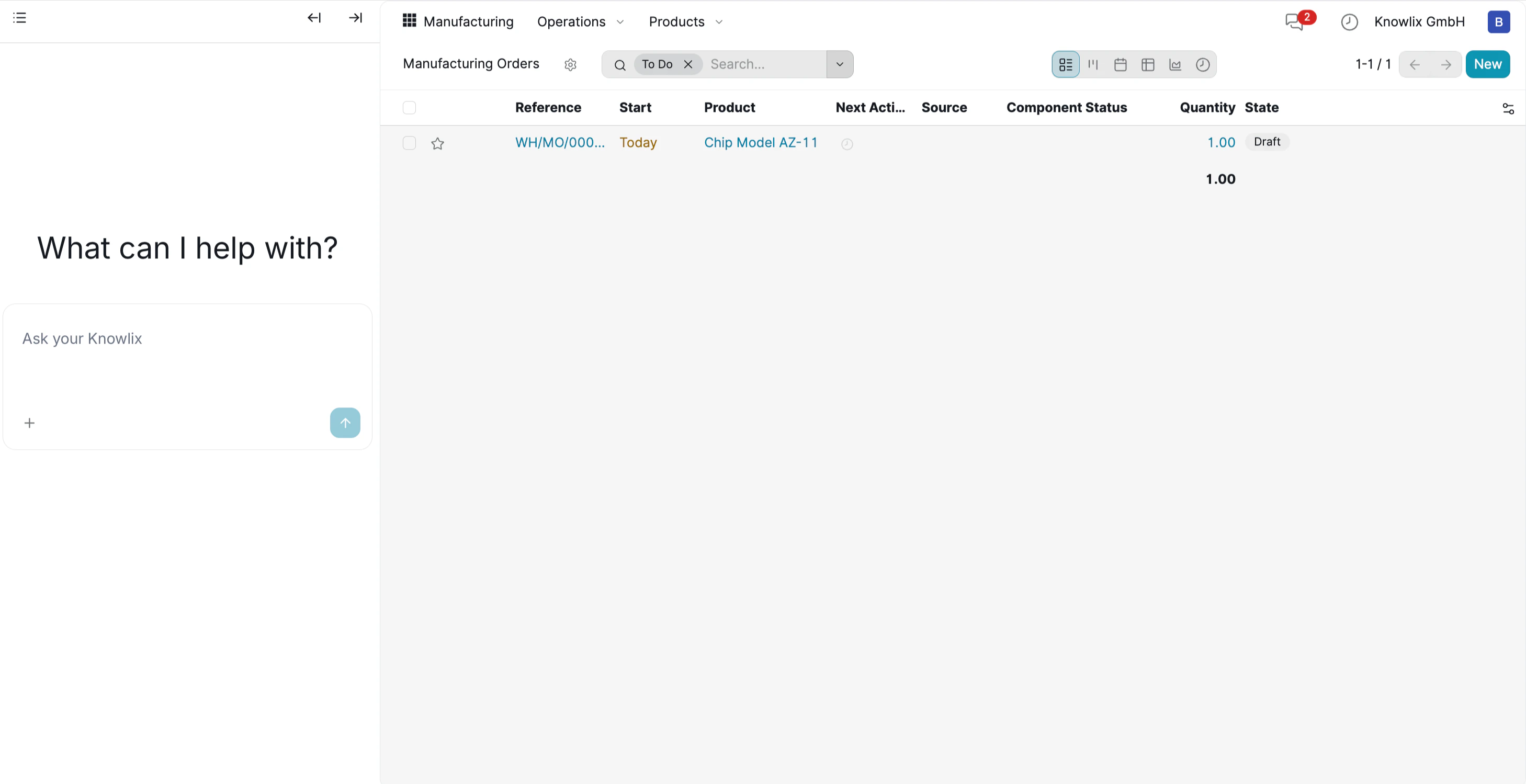 * Navigate to **Manufacturing** → **Manufacturing Orders**
* The main view displays your production orders with columns for Reference, Start Date, Product, Status, and Quantity
* On the left side, the Knowlix AI assistant awaits your commands with "What can I help with?"
* Instead of clicking through multiple menus to create orders manually, simply describe what you need in natural language
***
## 2. Create Manufacturing Order with AI
Use natural language to instantly generate complex manufacturing orders.
* Navigate to **Manufacturing** → **Manufacturing Orders**
* The main view displays your production orders with columns for Reference, Start Date, Product, Status, and Quantity
* On the left side, the Knowlix AI assistant awaits your commands with "What can I help with?"
* Instead of clicking through multiple menus to create orders manually, simply describe what you need in natural language
***
## 2. Create Manufacturing Order with AI
Use natural language to instantly generate complex manufacturing orders.
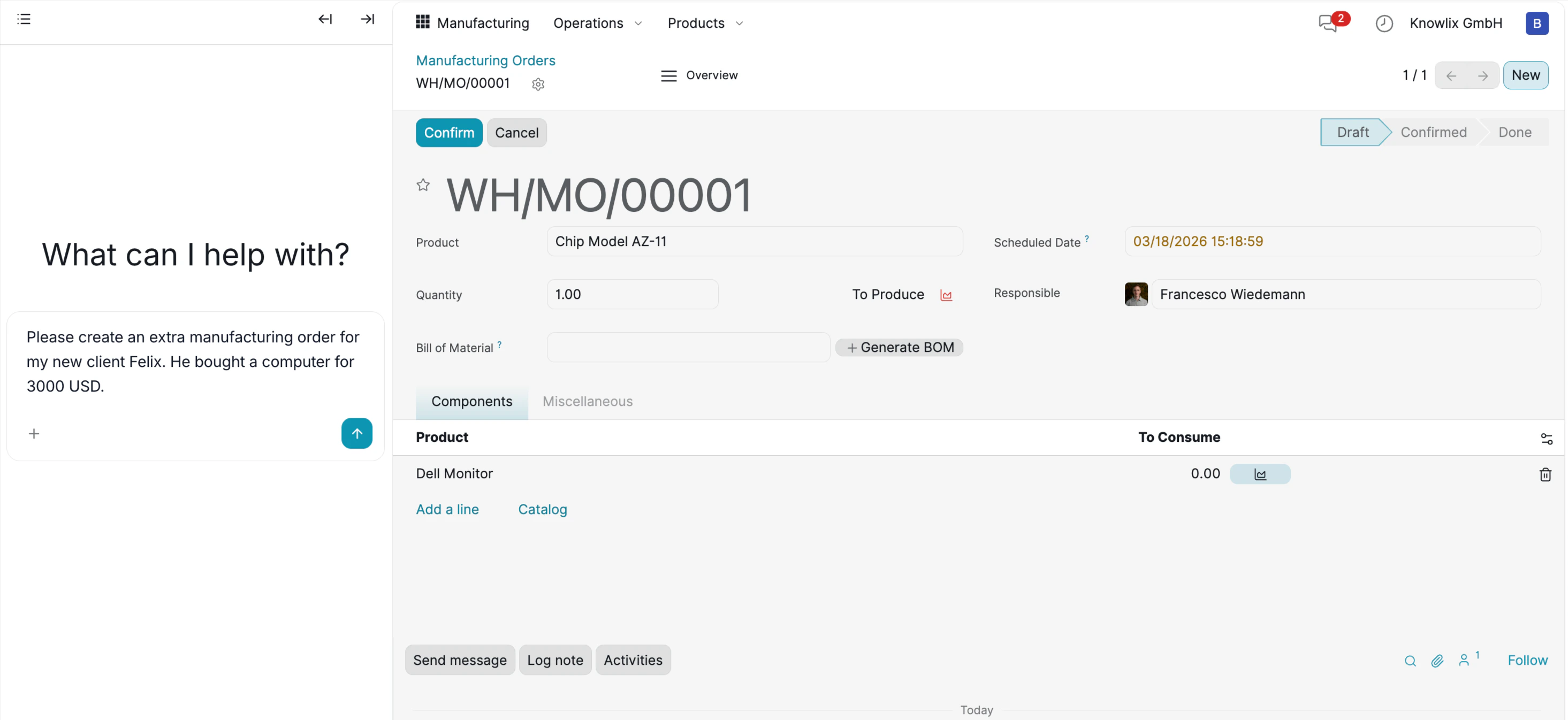 **Step 1: Enter Your Request**
Type your manufacturing request in the AI chat. For example:
*"Please create an extra manufacturing order for my new client Felix. He bought a computer for 3000 USD."*
**Step 2: AI Processing**
The AI understands your request and automatically:
* Creates Manufacturing Order **WH/MO/00001** in **Draft** status
* Identifies the main product: **Chip Model AZ-11**
* Generates a Bill of Materials (BoM) including **Dell Monitor** component
* Sets scheduled date and assigns to responsible personnel (**Francesco Wiedemann**)
* Calculates quantities: **1.00** unit to produce with **5.00** component quantity
The order is ready for review before confirmation.
***
## 3. Product and Component Management
AI intelligently recognizes products or creates new ones when needed.
**Step 1: Enter Your Request**
Type your manufacturing request in the AI chat. For example:
*"Please create an extra manufacturing order for my new client Felix. He bought a computer for 3000 USD."*
**Step 2: AI Processing**
The AI understands your request and automatically:
* Creates Manufacturing Order **WH/MO/00001** in **Draft** status
* Identifies the main product: **Chip Model AZ-11**
* Generates a Bill of Materials (BoM) including **Dell Monitor** component
* Sets scheduled date and assigns to responsible personnel (**Francesco Wiedemann**)
* Calculates quantities: **1.00** unit to produce with **5.00** component quantity
The order is ready for review before confirmation.
***
## 3. Product and Component Management
AI intelligently recognizes products or creates new ones when needed.
 * Access **Operations** → **Products** dropdown to view all available items
* Choose from **Manufacturing Orders**, **Unbuild Orders**, or **Scrap** workflows
* The system displays existing products like **Chip Model AZ-11**, **Dell Monitor**, and **Rayban Sunglasses** with their prices and stock levels
* When you mention a product that doesn't exist, AI automatically creates it in the system
***
## 4. Automated Sales Order Conversion
AI seamlessly converts manufacturing orders into confirmed sales orders.
* Access **Operations** → **Products** dropdown to view all available items
* Choose from **Manufacturing Orders**, **Unbuild Orders**, or **Scrap** workflows
* The system displays existing products like **Chip Model AZ-11**, **Dell Monitor**, and **Rayban Sunglasses** with their prices and stock levels
* When you mention a product that doesn't exist, AI automatically creates it in the system
***
## 4. Automated Sales Order Conversion
AI seamlessly converts manufacturing orders into confirmed sales orders.
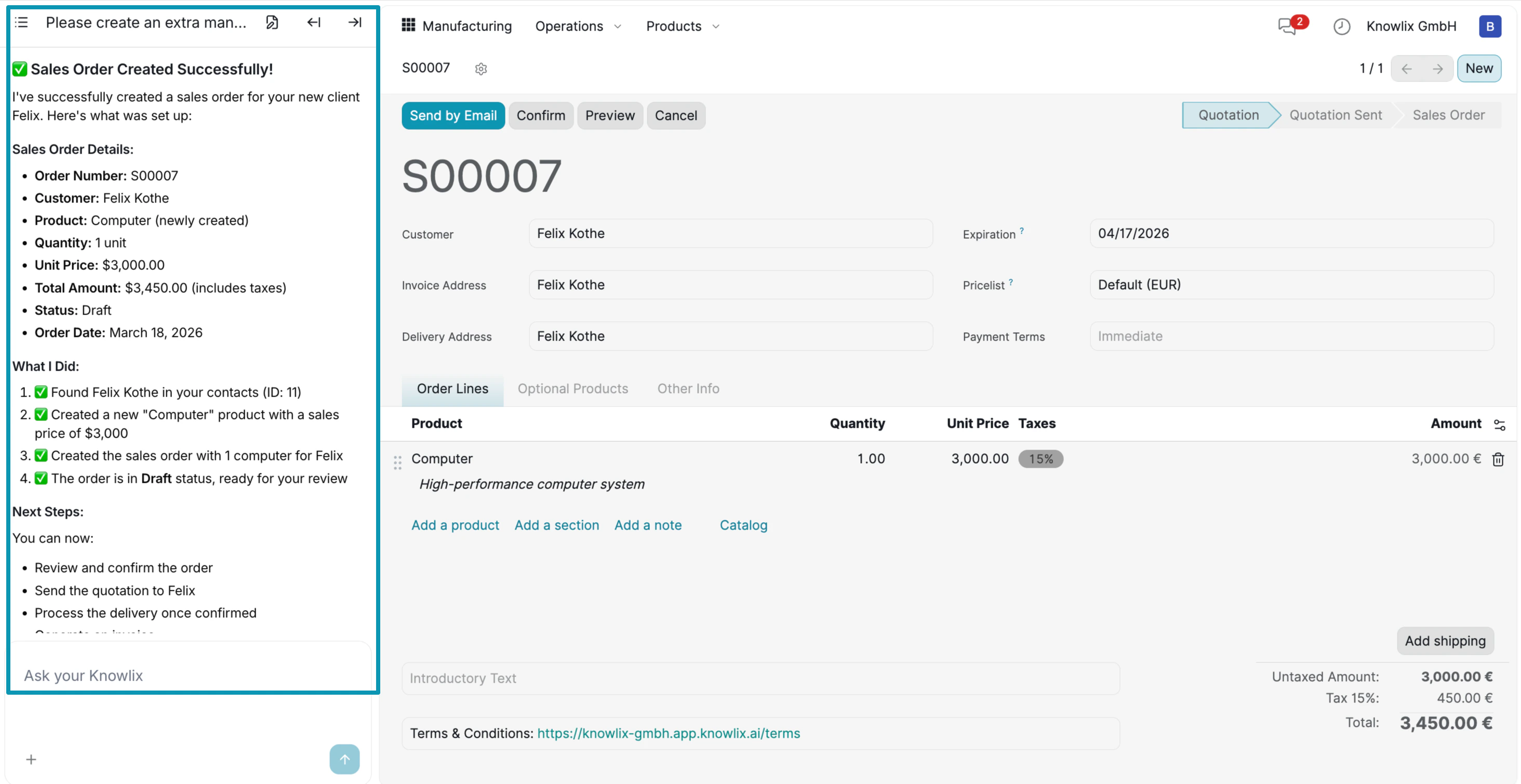 **AI Confirmation:**
After processing, the AI provides detailed feedback:
* **Sales Order Created Successfully!**
* Order number: **S00007**
* Customer: **Felix Kothe**
* Product: **Computer**
* Price: **\$3,000**
**What AI Did:**
* **Found Felix Kothe** in your contacts (ID: 11)
* **Created a "Computer" product** with sales price of \$3,000
* **Generated Manufacturing Order** with "1 Computer" for Felix
* **Created the order in Draft status**, ready for review
**Sales Order View:**
The main screen now shows Sales Order **S00007** with:
* Customer details and delivery address
* Product line: **Computer** at **3,000.00 €** (quantity: 1.00)
* Product description: "High-performance computer system"
* Status: **Quotation** (ready to confirm)
**Next Steps:**
You can now:
* Review and confirm the order
* Send the quotation to Felix
* Process the delivery once confirmed
The entire workflow from manufacturing request to sales order happens in one AI conversation, eliminating manual data entry and reducing errors.
***
## More Information
Production orders and factory operations
Equipment maintenance and preventive maintenance
Product lifecycle management
Product repair and maintenance tracking
Quality control and compliance management
Company vehicle fleet management
Onsite service management and field operations
AI assistant tips for the Supply Chain module
**AI Confirmation:**
After processing, the AI provides detailed feedback:
* **Sales Order Created Successfully!**
* Order number: **S00007**
* Customer: **Felix Kothe**
* Product: **Computer**
* Price: **\$3,000**
**What AI Did:**
* **Found Felix Kothe** in your contacts (ID: 11)
* **Created a "Computer" product** with sales price of \$3,000
* **Generated Manufacturing Order** with "1 Computer" for Felix
* **Created the order in Draft status**, ready for review
**Sales Order View:**
The main screen now shows Sales Order **S00007** with:
* Customer details and delivery address
* Product line: **Computer** at **3,000.00 €** (quantity: 1.00)
* Product description: "High-performance computer system"
* Status: **Quotation** (ready to confirm)
**Next Steps:**
You can now:
* Review and confirm the order
* Send the quotation to Felix
* Process the delivery once confirmed
The entire workflow from manufacturing request to sales order happens in one AI conversation, eliminating manual data entry and reducing errors.
***
## More Information
Production orders and factory operations
Equipment maintenance and preventive maintenance
Product lifecycle management
Product repair and maintenance tracking
Quality control and compliance management
Company vehicle fleet management
Onsite service management and field operations
AI assistant tips for the Supply Chain module