> ## Documentation Index
> Fetch the complete documentation index at: https://docs.knowlix.ai/llms.txt
> Use this file to discover all available pages before exploring further.
# AI Purchase
> Streamline your entire buying process from RFQs to purchase orders with AI-powered procurement
The Knowlix Purchase module streamlines your entire buying process, from sending Requests for Quotation (RFQs) to suppliers to confirming purchase orders. It provides a clear command center to track spending, monitor supplier performance, and ensure you never run out of stock.
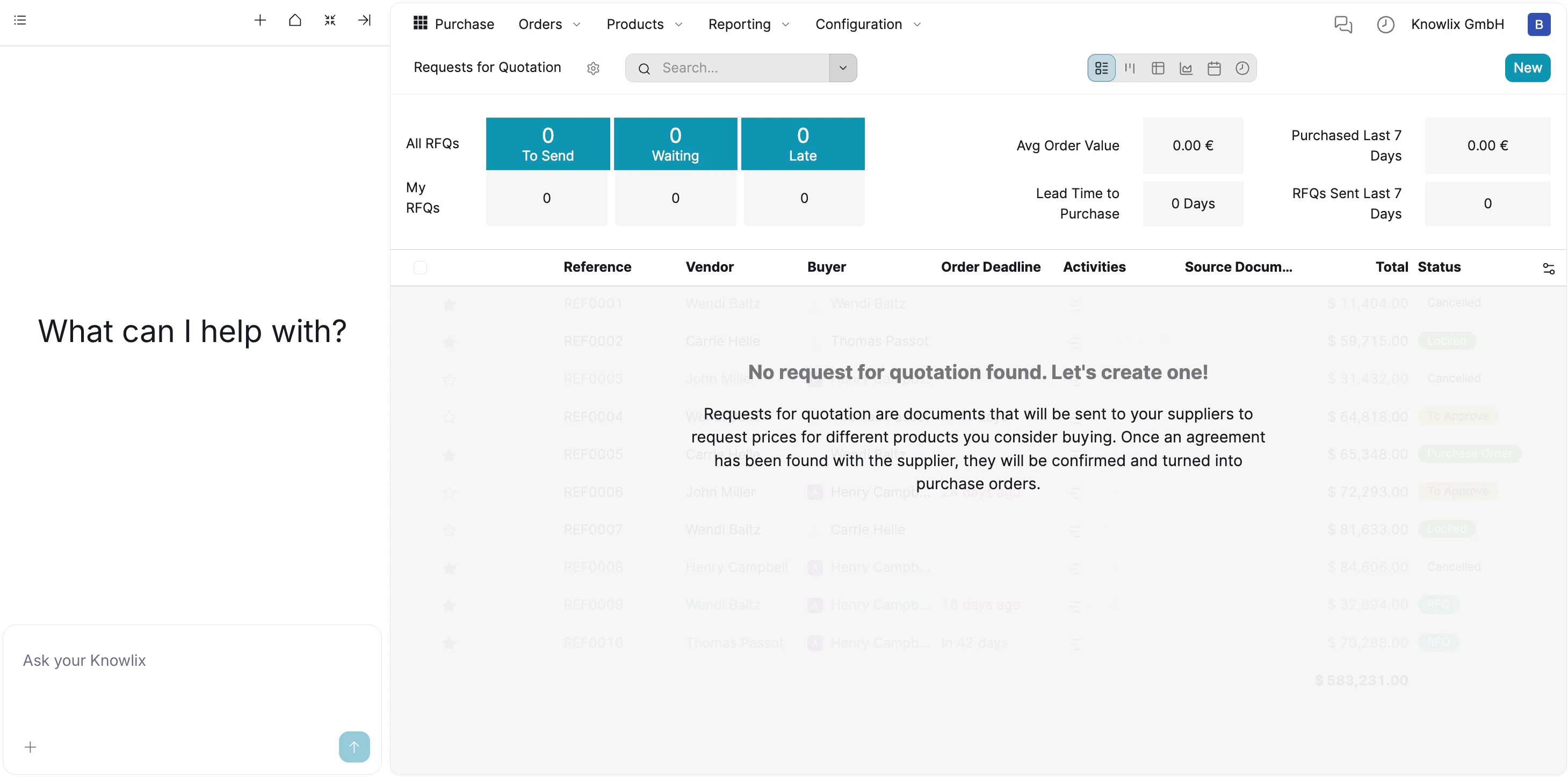 ### 1. Procurement Dashboard
The main dashboard gives you an instant snapshot of your purchasing health without needing to run complex reports.
**Status Tracking:**
The top banner categorizes all your RFQs into actionable buckets:
* **To Send:** Drafts waiting to be dispatched to suppliers
* **Waiting:** RFQs sent to suppliers awaiting response
* **Late:** Overdue requests requiring immediate attention
**Key Metrics:**
You can monitor vital performance indicators in real-time:
* **Average Order Value:** Track spending patterns
* **Purchased Last 7 Days:** Recent procurement activity
* **Lead Time to Purchase:** How long it takes to get goods
### 2. Workflow: RFQ to Purchase Order
The module is built around the "Request for Quotation" (RFQ) process:
1. **Create RFQ:** You start by creating a request listing the products you need.
2. **Send to Supplier:** This document is sent to vendors to get their best prices.
3. **Confirm Order:** Once you agree on the price, the RFQ is converted into a confirmed **Purchase Order**, signaling the supplier to ship the goods.
### 1. Procurement Dashboard
The main dashboard gives you an instant snapshot of your purchasing health without needing to run complex reports.
**Status Tracking:**
The top banner categorizes all your RFQs into actionable buckets:
* **To Send:** Drafts waiting to be dispatched to suppliers
* **Waiting:** RFQs sent to suppliers awaiting response
* **Late:** Overdue requests requiring immediate attention
**Key Metrics:**
You can monitor vital performance indicators in real-time:
* **Average Order Value:** Track spending patterns
* **Purchased Last 7 Days:** Recent procurement activity
* **Lead Time to Purchase:** How long it takes to get goods
### 2. Workflow: RFQ to Purchase Order
The module is built around the "Request for Quotation" (RFQ) process:
1. **Create RFQ:** You start by creating a request listing the products you need.
2. **Send to Supplier:** This document is sent to vendors to get their best prices.
3. **Confirm Order:** Once you agree on the price, the RFQ is converted into a confirmed **Purchase Order**, signaling the supplier to ship the goods.
 ### 3. AI-Assisted Buying
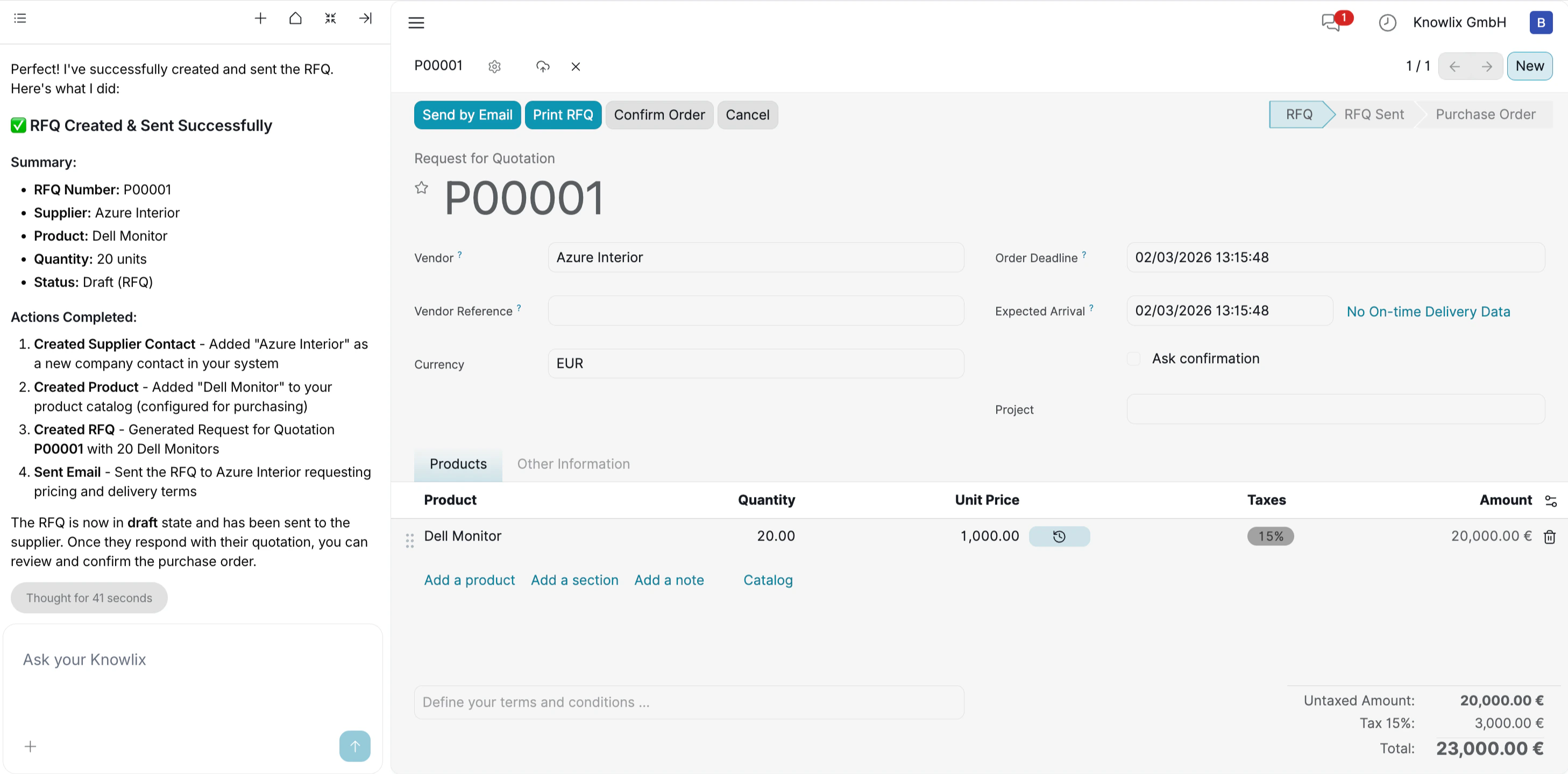
Instead of manually filling out supplier forms, you can use the **Knowlix Assistant** on the left.
**Example Command:**
*"Create an RFQ for 20 Dell Monitors from Azure Interior and send it by email."*
**Result:** The AI identifies the vendor, adds the products, and drafts the document instantly.
### 4. AI-Driven Purchase Order Creation
Knowlix eliminates the need to navigate through empty lists or search for "Create" buttons. You can initiate a purchase workflow directly through the chat interface, even when starting with a blank slate.
**Command Example:**
*"Can you create a purchase order for the rayban? The price is 5000 euro"*
**How it works:**
* **Intent Recognition:** The AI understands that the goal is a **Purchase Order** (not a sales quote or project task).
* **Data Extraction:** It pulls specific details from your natural language input—**Product:** "Rayban" and **Price:** "5000 euro"—to pre-fill the document automatically.
### 5. Automated Resource Creation
When you issue a command like *"Order Rayban"*, Knowlix does not stop if the data is missing. Instead, it intelligently generates the required records in the background to ensure the workflow proceeds without interruption.
**Smart Execution Details:**
* **New Vendor Creation:** The system recognized that "Rayban" was not in your contact list and automatically created a new vendor profile for them.
* **Product Generation:** Similarly, it identified "Rayban Sunglasses" as a new item and instantly created a product record with the specified price (**5,000.00 €**).
* **Financial Accuracy:** The AI automatically applied the standard tax rate (15%), calculating the final total of **5,750.00 €** without requiring manual math.
### 6. Real-Time Tracking & Prioritization
### 3. AI-Assisted Buying
Instead of manually filling out supplier forms, you can use the **Knowlix Assistant** on the left.
**Example Command:**
*"Create an RFQ for 20 Dell Monitors from Azure Interior and send it by email."*
**Result:** The AI identifies the vendor, adds the products, and drafts the document instantly.
### 4. AI-Driven Purchase Order Creation
Knowlix eliminates the need to navigate through empty lists or search for "Create" buttons. You can initiate a purchase workflow directly through the chat interface, even when starting with a blank slate.
**Command Example:**
*"Can you create a purchase order for the rayban? The price is 5000 euro"*
**How it works:**
* **Intent Recognition:** The AI understands that the goal is a **Purchase Order** (not a sales quote or project task).
* **Data Extraction:** It pulls specific details from your natural language input—**Product:** "Rayban" and **Price:** "5000 euro"—to pre-fill the document automatically.
### 5. Automated Resource Creation
When you issue a command like *"Order Rayban"*, Knowlix does not stop if the data is missing. Instead, it intelligently generates the required records in the background to ensure the workflow proceeds without interruption.
**Smart Execution Details:**
* **New Vendor Creation:** The system recognized that "Rayban" was not in your contact list and automatically created a new vendor profile for them.
* **Product Generation:** Similarly, it identified "Rayban Sunglasses" as a new item and instantly created a product record with the specified price (**5,000.00 €**).
* **Financial Accuracy:** The AI automatically applied the standard tax rate (15%), calculating the final total of **5,750.00 €** without requiring manual math.
### 6. Real-Time Tracking & Prioritization
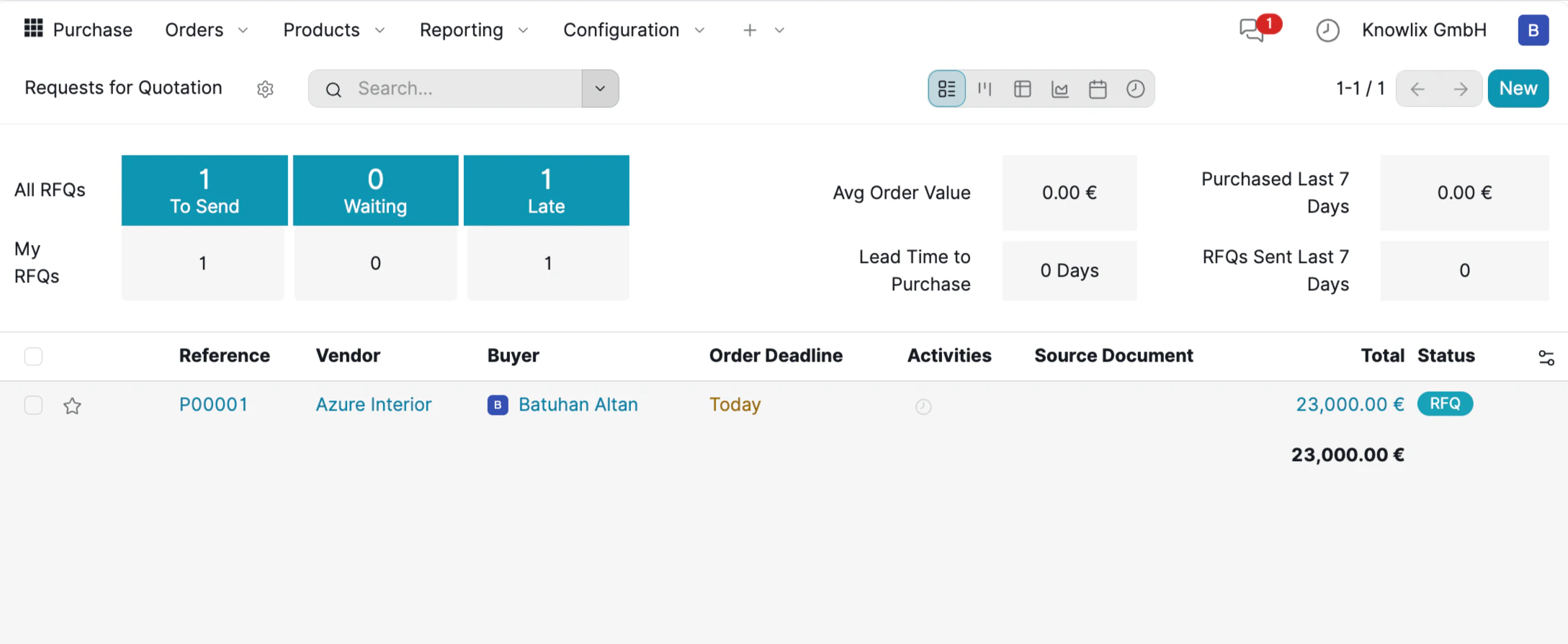 Once your Purchase Order is saved, the Purchase Dashboard updates instantly to reflect the new status. This view acts as your daily "To-Do List," helping you prioritize urgent tasks without digging through files.
**Live Dashboard Updates:**
* **Actionable Counters:** The top banner flags items like **1 To Send** and **1 Late**. This immediate feedback ensures no draft is forgotten and helps you spot bottlenecks instantly.
* **Financial Visibility:** The list view displays the confirmed value, allowing you to track committed spend against your budget at a glance.
**Smart Alerts:**
* **Deadline Highlighting:** The system visually prioritizes your work. The **Order Deadline** is marked in yellow (e.g., **"Today"**), signaling that this action requires immediate attention to ensure on-time delivery.
### 7. Draft Review & Customization
While the Assistant accelerates the process by drafting the Request for Quotation (RFQ), Knowlix ensures you retain full control over the final details before anything is sent to a vendor.
**Manual Override & Editing:**
The generated document opens in an editable view, allowing you to fine-tune the data based on real-time negotiations or budget adjustments.
* **Price Adjustment:** You can manually click into the **Unit Price** column to update costs.
* **Quantity & Terms:** You can easily adjust the quantity or modify the **Order Deadline** to match your project timeline.
Once your Purchase Order is saved, the Purchase Dashboard updates instantly to reflect the new status. This view acts as your daily "To-Do List," helping you prioritize urgent tasks without digging through files.
**Live Dashboard Updates:**
* **Actionable Counters:** The top banner flags items like **1 To Send** and **1 Late**. This immediate feedback ensures no draft is forgotten and helps you spot bottlenecks instantly.
* **Financial Visibility:** The list view displays the confirmed value, allowing you to track committed spend against your budget at a glance.
**Smart Alerts:**
* **Deadline Highlighting:** The system visually prioritizes your work. The **Order Deadline** is marked in yellow (e.g., **"Today"**), signaling that this action requires immediate attention to ensure on-time delivery.
### 7. Draft Review & Customization
While the Assistant accelerates the process by drafting the Request for Quotation (RFQ), Knowlix ensures you retain full control over the final details before anything is sent to a vendor.
**Manual Override & Editing:**
The generated document opens in an editable view, allowing you to fine-tune the data based on real-time negotiations or budget adjustments.
* **Price Adjustment:** You can manually click into the **Unit Price** column to update costs.
* **Quantity & Terms:** You can easily adjust the quantity or modify the **Order Deadline** to match your project timeline.
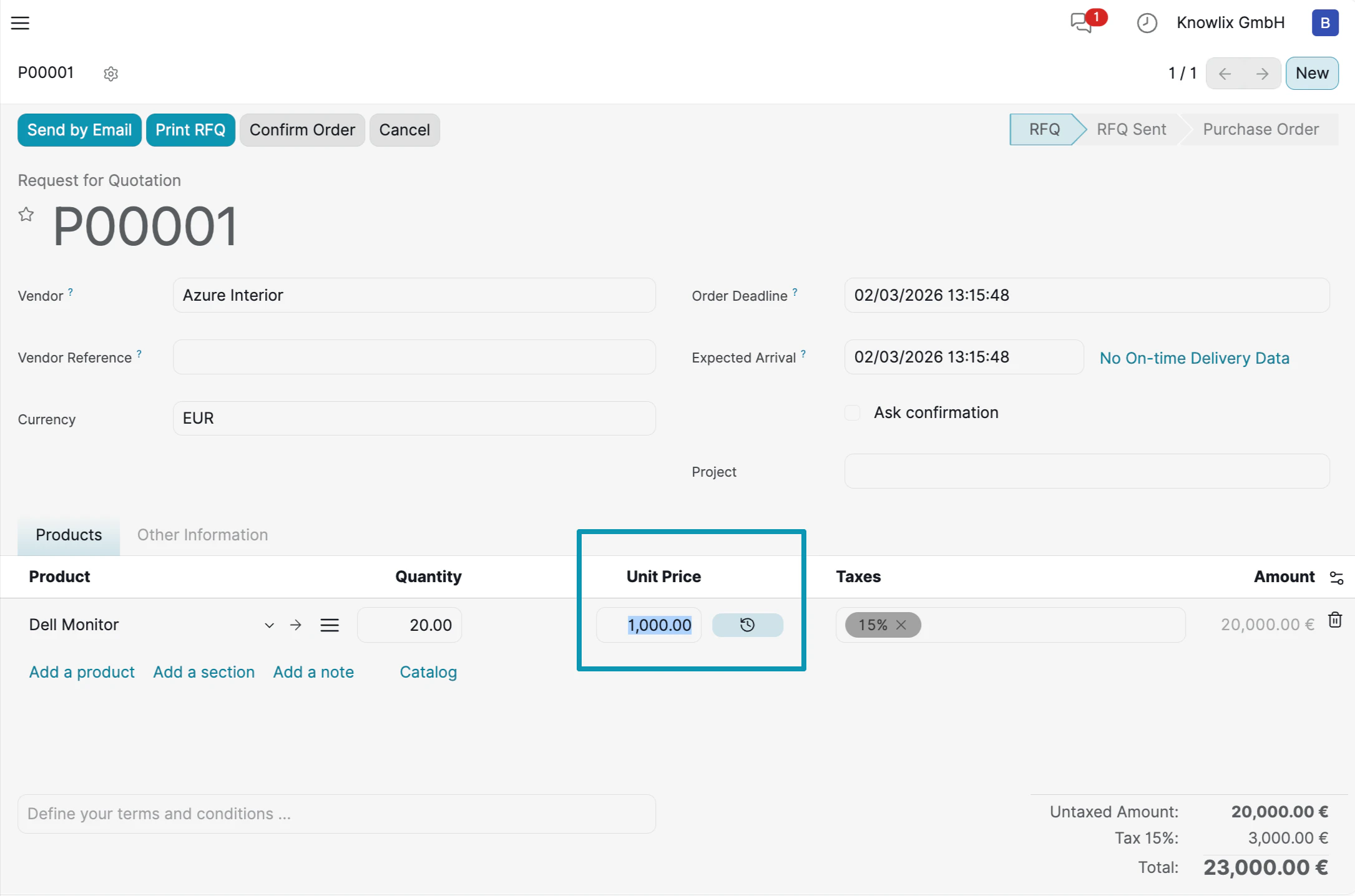 **Finalizing the Order:**
Once the details are verified:
* **Send by Email:** Dispatch the RFQ to the vendor immediately.
* **Confirm Order:** Click this button to convert the draft RFQ into a binding Purchase Order, officially triggering the procurement workflow.
***
## More Information
Supplier orders and procurement management
AI assistant tips for the Supply Chain module
**Finalizing the Order:**
Once the details are verified:
* **Send by Email:** Dispatch the RFQ to the vendor immediately.
* **Confirm Order:** Click this button to convert the draft RFQ into a binding Purchase Order, officially triggering the procurement workflow.
***
## More Information
Supplier orders and procurement management
AI assistant tips for the Supply Chain module