
1. Invoice Management
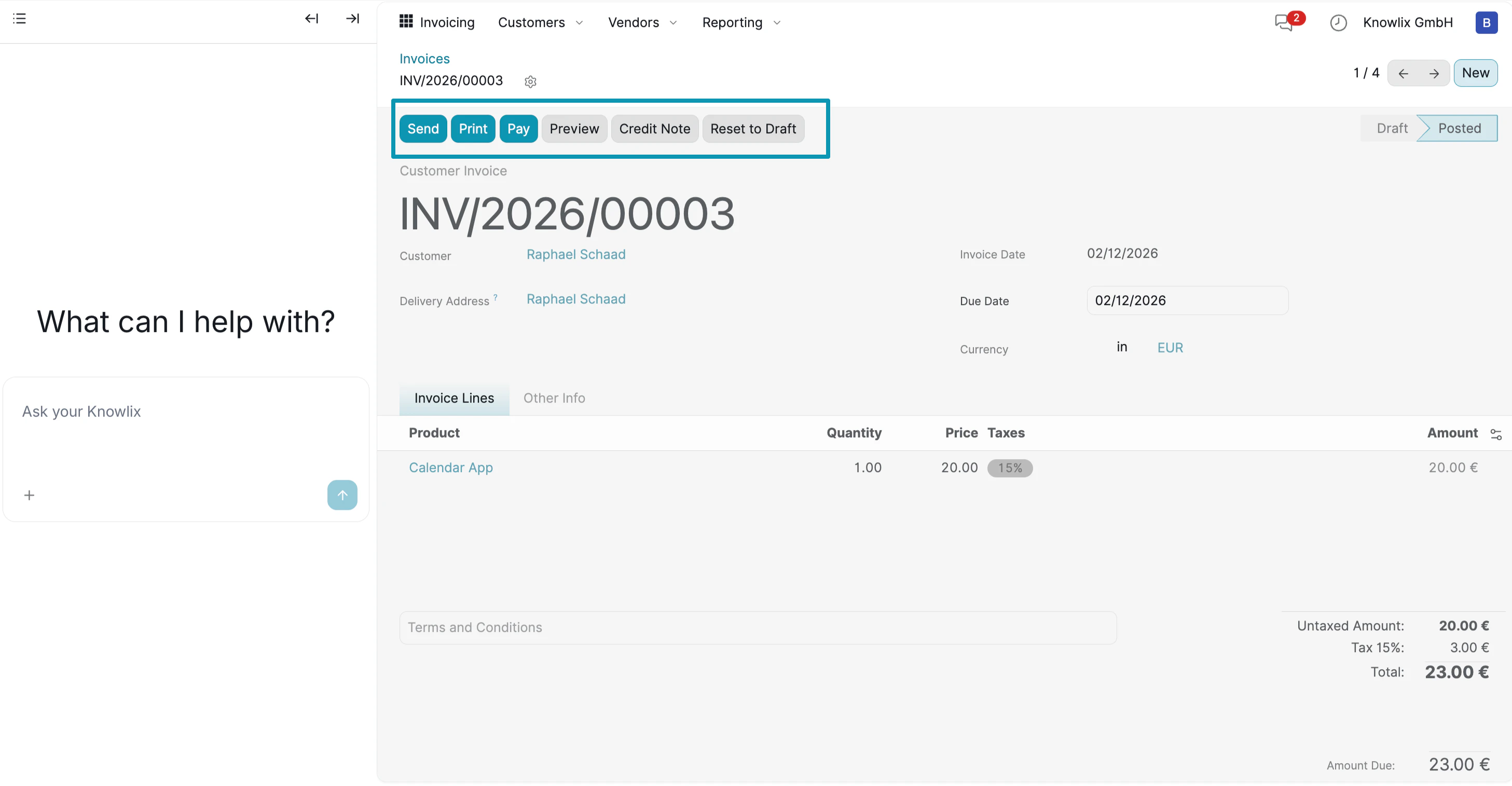
The Invoice Detail View provides complete control over individual invoices, allowing you to manage payments, send documents, and track status.- Invoice Header: Displays the invoice number (e.g., INV/2026/00003), customer name, and current status (Draft or Posted).
- Customer Details: Shows customer information including name, delivery address, invoice date, and due date.
- Line Items: Lists all products or services with quantity, price, and tax calculation. In this example: Calendar App at 20.00 € with 15% tax.
- Totals: Automatically calculates untaxed amount, tax, and final total (23.00 €).
- Send: Email the invoice directly to the customer with a PDF attachment.
- Print: Generate a printable PDF version.
- Pay: Register a payment when the customer pays.
- Preview: See how the invoice looks before sending.
- Credit Note: Create a credit note if you need to refund or adjust.
- Reset to Draft: Return a posted invoice to draft status for editing.
2. Payment Tracking
Navigate to Customers → Payments to view all recorded payments and their status.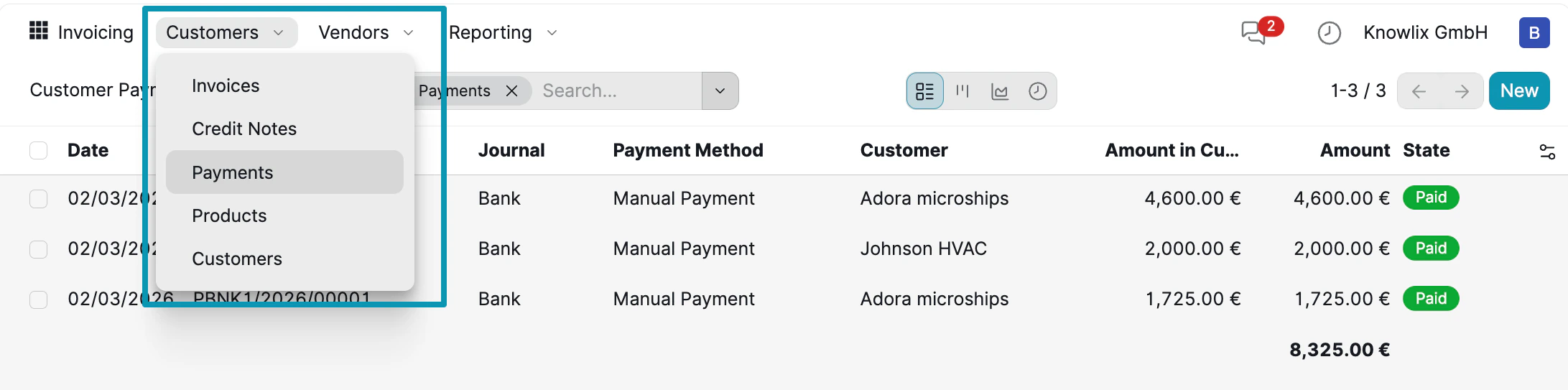
- Date Column: When the payment was recorded (e.g., 02/03/2026).
- Journal: The payment method used (Bank, Cash, etc.).
- Payment Method: How the payment was processed (Manual Payment, Online, etc.).
- Customer: Which customer made the payment (Adora microships, Johnson HVAC).
- Amount in Currency: The original payment amount.
- Amount: The converted amount in your base currency.
- State: Payment status with color-coded badges (Paid in green).
- Invoices: View all customer invoices
- Credit Notes: Manage refunds and adjustments
- Payments: Track all payment records
- Products: Manage your product catalog
- Customers: View customer database
3. Products & Pricing
Navigate to Vendors → Products to manage your product catalog and pricing.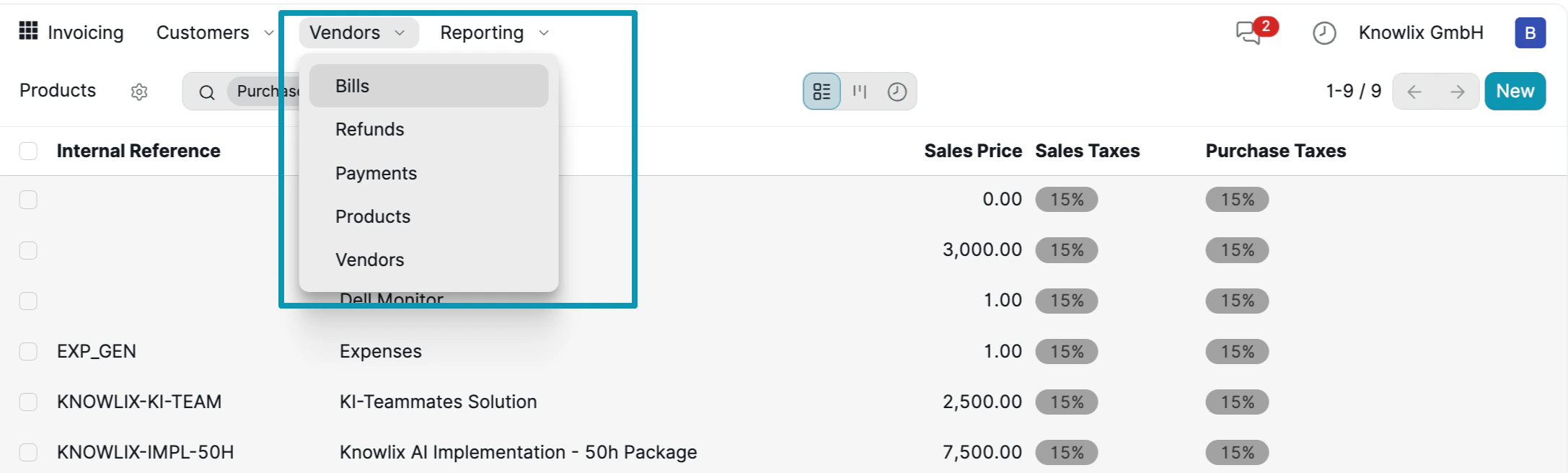
- Internal Reference: Product code for internal tracking (e.g., KNOWLIX-KI-TEAM, KNOWLIX-IMPL-50H).
- Product Name: Descriptive name shown on invoices (KI-Teammates Solution, Knowlix AI Implementation - 50h Package).
- Sales Price: The default price charged to customers (2,500.00 €, 7,500.00 €).
- Sales Taxes: Tax rate applied to the product (15%).
- Purchase Taxes: Tax rate for vendor purchases.
- Bills: View and manage vendor bills
- Refunds: Track vendor refunds
- Payments: Record payments to vendors
- Products: Manage product catalog
- Vendors: View vendor database
4. Reporting & Analytics
Navigate to Reporting → Invoice Analysis to view financial trends and insights.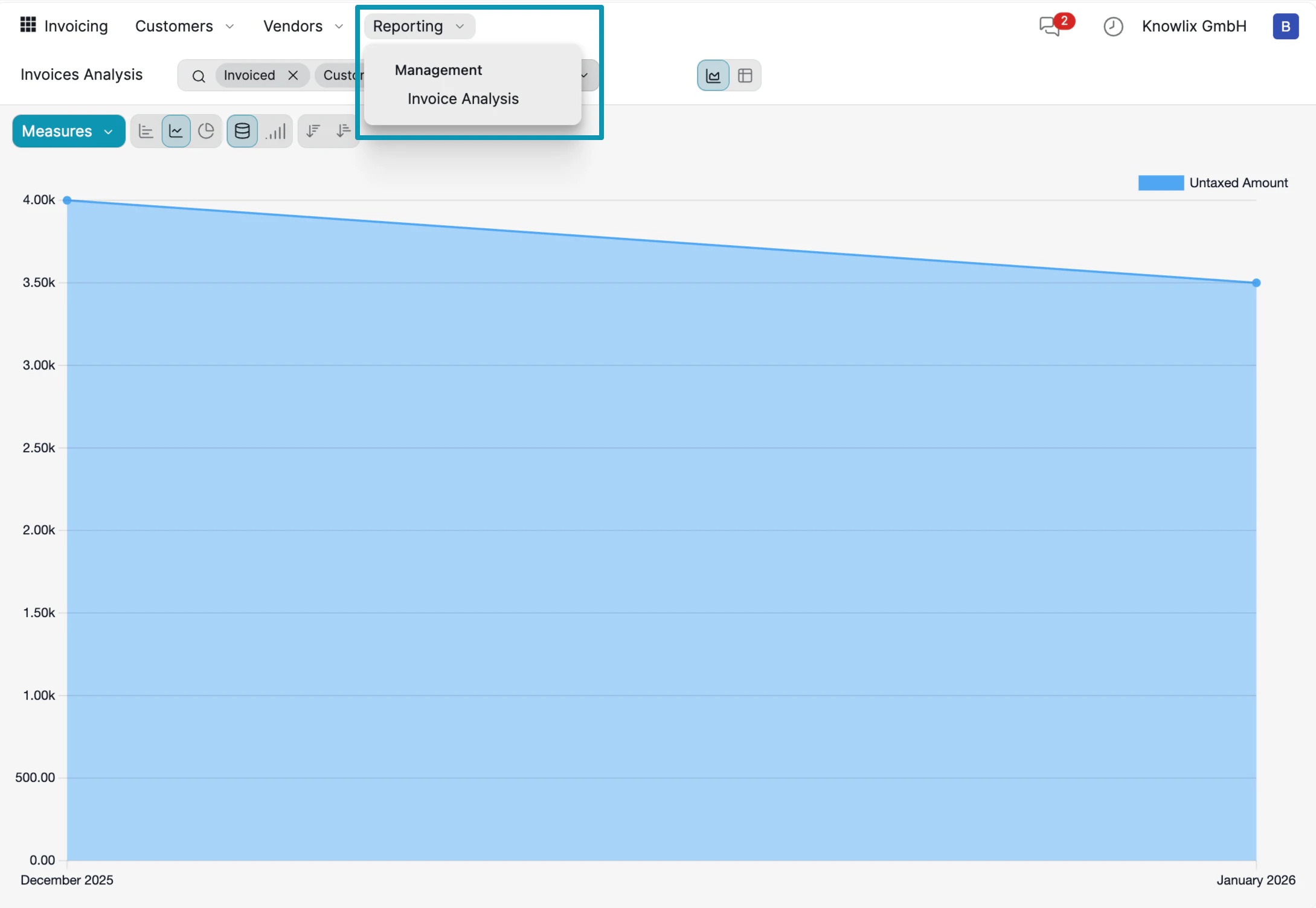
- Trend Chart: The line graph shows Untaxed Amount over time, helping you identify revenue patterns. In this example, revenue trends from approximately 4,000 € in December 2025 to 3,500 € in January 2026.
- Measures Button: Click to change what metric is displayed (Untaxed Amount, Total, Count, etc.).
- Chart Types: Toggle between line, bar, pie, and other chart formats using the toolbar icons.
- Filters: Use the search bar with tags like “Invoiced” and “Customer” to filter the data.
- Management: Overview of key financial metrics
- Invoice Analysis: Detailed invoice trends and breakdowns
Instead of manually navigating through reports, ask the Assistant: “Show me invoice trends for last quarter” or “What’s our average invoice value this month?” to get instant insights.
More Information
Accounting
Double-entry bookkeeping system and financial reporting
Payment Providers
Online payment integrations and gateway configuration
Pro Tips: Finance
AI assistant tips for the Finance module